Sunday, July 30, 2017

How to write a Email policy .


In the business world, communication is key and they way you communicate can make or break the image of the company. Never the less it is also important to make these communication channels to be secure so that no harm will be done to tarnish the companies good name. 

In this blog post I have provided you a sample on how to write an Email policy relating to an Issue Specific Information Security policy for a company. The reason why i have selected email is that currently email is one of the main communication channels that is chosen by companies to communicate official matters.


Email Policy for ABC Company

Disclaimer: This policy is created .for the ABC company and can be used by any person that uses the email service provided by the ABC company. No prior notice is required for the use of the policy. Suggestions are welcome to improve the policy and can be submitted to the Information security department for any ideas.

1.      Overview
     The main purpose of this policy is to create an acceptable use of the ABC Companies email service and its other relating services. This policy will be maintained by the Information security department and will be revised every year. This policy will be made available to everyone and will be displayed as the first page once login to the emails. Any exceptions required will require prior approval by the stated parties in the policy.

2.      Purpose of the policy

Make sure that the ABC companies email system is used in a proper manner as well as to make the users aware of the ABC companies unaccepted and accepted usage rules of the email system. The minimized outlines of usage of electronic mail communication within the network of ABC company.
3.      Scope of the policy

The policy applies to ABC companies all members who are granted permission of the email service. This includes all the emails send with the use of the ABC companies email address. The policy applies to purpose of receiving and sending email via the ABC company service including network, hardware and software provided by the ABC company.

   3.1 Users are as follows.

  • Management
  • Employees
  • Stakeholders
4.      Policy

4.1.   Content of the email
  • The tone of the emails sent should be polite and professional. No usage of offensive material will be tolerated.
  • Usage of formal style for the format of the document should be referred.
  • Links to unauthorized materials should not be communicated via email.
  • Attachments of documents should be done with the approval of the manager as they might contain sensitive data.
  • Email signature should be attached to every email sent via the company email address.
  • The content of the emails of the ABC company should be secured as per the standards of the data protection.
4.2.   Permitted Use
  • ABC company email system should only be used for business purposes only.
  • No personal usage of the system will be entertained.
  • All received emails should be checked for viruses.
  • Opening of attachments or links in the emails should be done in a secured environment and only after a virus scan.
  • No attachments should be saved in employee’s computers, if required should be approved by the respective mangers.
  • Usage of mobile devices to send emails using the company email services is only authorized to the higher management (Management staff above level 3 of the employee hierarchy)
4.3.   Sending emails
  • ABC employees should use passwords as recommended by the company and they should be changed after 30 days.
  • No emails should be synchronized to be auto forwarding.
  • Emails sent and received will be monitored without any prior notice to the employees. 
  • Emails containing confidential data should be encrypted prior to sending.
4.4.   Receiving of emails
  • All emails categorized as secret or above should be responded within 2 hours.
  • All emails received should be subjected to a virus scan prior to opening.
5.      Policy Compliance
5.1.   Monitoring and measurement

The information security team will be looking in to verifying the compliance of this policy. This checks will be performed without prior notice. This checks will be done via internal and external audits, time to time walk through, and with the usage of business tools provided to them. After every inspection a feedback will be provided and actions will be taken accordingly.

5.2.   Exceptions in the policy
Any exceptions required should be approved by the higher management and the Information security team prior to exercising.

5.3.   Act of non-compliance of policy

Any employee monitored of not complying to the policy will be subjected to disciplinary hearing and will be terminated by the ABC Company.


6.      Implementation

6.1.   Expert and legal advice should be taken when considering data protection and privacy.
6.2.   The policy will be made available to everyone.
6.3.   The policy will be displayed as the first page once a user logs in to the email service of the              ABC company and will require to sign and acknowledge of the policy.
6.4.   All employees should be trained and educated on the policy.
6.5.   Policy will be revised every year by the Information Security team.

7.      Standards relating to the policy

7.1.   Data protection standard.

8.      Revision History
Date revised
Responsible offices
Approved by
Approved Date
Summary of change done
05/07/2017
K.M.Been
U.I.Sorr
30/07/2017
Updated virus check


Saturday, July 29, 2017

Securing the Network

In order to secure a network constant attention and updated knowledge on the area is required. More than that having best practices can help you to improve the security of your network. I would like recommend few best practices that you could follow prior to getting to know more technical ways to secure the network.

Best practices in securing a network

  • Using strong passwords and changing them often.
  • perform backups and test the backup files on a regular basis.
  • Encrypt and use passwords to protect sensitive data.
  • Avoid using unnecessary services.
  • Use updates firewalls with proper configurations.
  • Use VPNs, antivirus software and content filtering to your network.


How to mitigate Malware

Malware basically consists of virus, Trojan horse and worms. These can cause harms to the network based on the level of security you have implemented. The primary means of mitigating malware is using Antivirus software. Antivirus software are widely developed security product.Antivirus guards can be installed in the computers and servers as well.Using an antivirus guard can help the users to keep the network free of malware.


Friday, July 28, 2017

IPsec Protocol

IPsec protocol is a standard that is used in VPNs to secure the IP networks.IPsec protocol also protects and authenticates the IP packets that are sent from the source to the destination. The main functions of the IPsec protocol are as follows.
  • Authentication using Internet Key Exchange (IKE).
  • Integrity using hashing.
  • Confidentiality using encryption.
  • Secure key exchange using the Diffie-Helman algorithm. 

The IPsec framework is very flexible so that the users can integrate it to new security technologies.To learn about how this framework can be aligned to different security functions and standards lets get to know about the IPsec framework.

IPsec Framework

The IPSec framework consists of 5 levels. They are IPsec protocol, confidentiality, integrity, authentication and Diffie-Helman.


IPsec protocol 

This consists of Authentication Header (AH) and Encapsulation security protocol (ESP) , hear either one or both can be used.In this layer the AH can be used to authenticate the Layer 3 packets and the ESP can be used to encrypt layer 3 packets.

Confidentiality layer 

This secures the confidentiality of the layer 3 packets. This layer consists of encryption standers such as Data encryption standards (DES), Triple DES (3DES), Advances encryption standards(AES), or the SEAL encryption standard.

Integrity Layer 

In this layer it makes sure that the data that is sent across and unchanged at using the hashing algorithm . This uses hashing algorithms such as the message-digest 5 (MD5) or Secure Hash algorithm (SHA)

Authentication Layer

This uses the Internet Key Exchange (IKE) to authenticate users as well as devices . For this it uses various methods such as user name passwords , bio-metrics, pre-shared keys (PSK), (RSA) Algorithm, and onetime passwords.


Diffie-Helman

Diffie-Helman is used in the framework to provide a public key exchange method among the two pears and to create a secret key. For this you can select from DH14,15,19,20,21.

IPsec Implementation

When dealing with the IPsec protocol you must be aware of the IPsec Security Association as this is considered as a fundamental concept of IPsec.  IPsec Security Association is a relationship among the two entities that communicates with each other. Hear the entities must describe how they will be using the security services to communicate securely. The pears must have the same SA to negotiate the Key to exchange it with each other. Below is an illustration of how the SA can be used.


Thursday, July 27, 2017

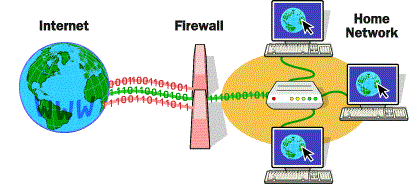
Firewall made simple


The term firewall was initially taken from the concept of constructing walls to stop spreading of fire.

This concept is used in networking to prevent unwanted traffic entering a certain area of network.


Common properties of firewalls


  • Firewalls has an access control policy
  • Acts as the transit point between networks
  • Firewalls are resistant to attacks


Common Types of Firewalls
  1. Statefull Firewall            :  Monitors the traffics state of connection (initiation , date transfer or    a termination of state)
  2. Packet filtering firewall  : The router filters the packets contents
  3. Proxy firewalls               : Filters information at the layers of 3, 4, 5 and 7 of the OSI model.

Next generation firewalls

Next generation firewalls are more advanced than the state full firewalls in various ways.
They have a granular identification method with visibility and controls of behaviors in the applications. Next gen firewalls has a proactive protection against the threats of the internet. Policies could be enforced based on the device, user, role, threat profile or on the application type.


Wednesday, July 26, 2017

Virtual Private Network in simple language


We all use internet in our day to day life and lets admit it we all love internet, but the big question is how safe is it? Using a VPN ( Virtual Private Network) might be the perfect solution for it. So lets get to know about VPN.

 Virtual Private Network is a network that is built on a public network and that is mainly the internet. just as the word itself says its

Virtual   : provides a private connection directly to the website or another computer you want to connect to.


Private  : All your online activity will be with you and the website that you visit.


Network : It is generated on a separate network on VPN servers .


A VPN makes sure that the private network is secured. This is provided by using encryption and other security mechanism to ensure that only the authorized users are able to access the network and that these data and not being intercepted.Virtual Private Networks uses virtual connections routed through the internet from the organization to the remote site.

Benefits of using a VPN

1) Security            :   VPNs provide the highest level of security available,  by using advanced                 encryption and  authentication protocols that protect data from unauthorized access.

2) Scalability        : VPNs allow organizations to use the Internet, making it easy to add new users without adding significant infrastructure.

3) Compatibility   : VPNs can be implemented across a wide variety of WAN link options including all the popular broadband technologies. Remote workers can take advantage of these high-speed connections to gain secure access to their corporate networks.

4) Cost saving      : With the advent of cost-effective, high-bandwidth technologies, organizations can use VPNs to reduce their connectivity costs while  increasing remote connection bandwidth.

Types of VPNs

1) Remote access VPN

2) Site to site VPN

When talking about VPNs another common word that comes in to your mind is the IPsec Protocol , but do you realy know what it is ? If not lets get to know what IPsec Protocol is and its connectivity with a VPN.


IPsec Protocol

IPsec is a standers that defines how a VPN can be secured across IP networks. It protects as well as
authenticates IP packets between the source and the destination.The main facilities it provides are as follows

  • Confidentiality
  • Integrity
  • Authentication
  • Secure key exchange ( Deffie helman algorithm)

Tuesday, July 25, 2017

WarGame - Bandit walk through level 0 - 10


War game is a concept where you can train your mind and improve your knowledge on hacking as well as to learn and practice your knowledge on Linux commands.Mainly these include the concepts of capture the flag logic behind it.You can also improve your password cracking skills , pentesting skills and many more other hacking techniques. I have provided a walk through on a game called Bandit . Hear you can proceed from one level to another.

Login to http://overthewire.org/wargames/  , hear you will be able to select the war game you want to play.


Select Bandit. In this war game there are 27 levels in which you have to complete one by one to proseed to the next level. Lets start with level zero.

Level 0

The goal of this level is for you to log into the game using SSH.Download Putty , we use putty as an SSH client on windows. Once done to connect to the host use the below details and login with the given credentials. 
Host name : bandit.labs.overthewire.org
Port           : 2220

Level 0 - 1


After login in use the ls  command to view all the directories .
Now you will find a readme file. You can read this by using the cat command.


Level 1 - 2

Login to level 1 using the above details .Now use again the ls command to find the - file and again use the cat command and get the password

Level 2 - 3

The password for the next level is stored in a file called "spaces in this filename". Use the cat command along with "" to get the password

Level 3 - 4

Password for the next level is stored in the file name inhere directory. You need to go in to the directory and check the directory by using the command ls -al  and get the password using the cat  command .

Level 4 - 5

The password for the next level is stored in the only human-readable file in the inhere directory. Tip: if your terminal is messed up, try the “reset” command.

Level  5 - 6

The password for the next level is stored in a file somewhere under the inhere directory and has all of the following properties:

  • * human-readable      * 1033 bytes in size  * not executable

    Use ls -l to view all the save items. Then use the find command with the required specifications.

Level  6 - 7

The password for the next level is stored somewhere on the server and has all of the following properties:
  • * owned by user bandit   * owned by group bandit6   * 33 bytes in size
  • Use the find command  with the above specifications

  • once you get the results use the cat  command to grab the password


Level  7 - 8

The password for the next level is stored in the file data.txt next to the word millionth


Next use the bellow command to get the password
 cat data.txt | grep millionth


Level  8 - 9

The password for the next level is stored in the file data.txt and is the only line of text that occurs only once

use the ls command to view the data.txt file. Next we need to find a unique line among many other details. For that use the below command and get the password.

cat data.txt | sort | uniqu -u


Level 9 - 10

The password for the next level is stored in the file data.txt in one of the few human-readable strings, beginning with several ‘=’ characters.

for this use the ls  command . Then use the below command to view the password.

string data.txt | grep '='


Friday, May 19, 2017

OAuth 2.0 for Facebook Apps


OAuth 2 is an authorization framework that enables applications to obtain limited access to user accounts on an HTTP service, such as Facebook, GitHub, and DigitalOcean. It works by delegating user authentication to the service that hosts the user account, and authorizing third-party applications to access the user account. OAuth 2 provides authorization flows for web and desktop applications, and mobile devices.
First, we need to go to the Facebook developer site and create an application there.

Go to "My Apps" on top right corner and select "Create new app"
Then a window will be pop up. Then we can enter required details and "Click create app ID"
Now you can see Facebook login and "Get Started" button then click it.

Then you will see something like this. Click on "Get Started" in Audience Network.


In the setting, You need to provide App domain and website URL. Before setting the web URL you need to Add Platform first.
In "settings" provide a App Domain and a Website URL. To provide a Website you have to click on "+ Platform" and then click on website.

In the setting, You need to provide App domain and website URL. Before setting the web URL you need to Add Platform first.
In the dashboard, we can see our App ID and App  Secret
Now let's see how can we use these values to get information from Facebook.

1) response_type
     Code
     Code

2) client_id
     242861496196301
     242861496196301

3) redirect_uri
     http://localhost:8080/OAuthfbapp/
     http%3A%2F%2Flocalhost%3A8080%2FOAuthfbapp%2F

4) Scope
     public_profile user_posts user_friends user_photos
     public_profile%20user_posts%20user_friends%20user_photos

Now we cancombine these values and make the URL.

https://www.facebook.com/dialog/oauth?response_type=code&client_id=242861496196301
&redirect_uri=http%3A%2F%2Flocalhost%3A8080%2FOAuthfbapp%2F&scope=public_profile%20user_posts%20user_friends%20user_photos


Enter that URL in the url bar of your web browser and hit enter. now you can see some thing like this. This is called as user consent page. In the consent page, you can edit what is application going to get your side.

I'm not going to edit this because i'm the owner of this application. then i clicked "Continue as Harshani"

after that this page will appear.
This page appear, becuase for generally we don't have a project whitch support http://localhost:8080/fbappOAuth/
But when we cheack the URL, we cann authorization code is sent to us from Facebook.
( code=.......)

Obtain access token

To get the access token we need to have onther four parameters.

1) grant_type
     authorization_code

2) client_id
     242861496196301

3) redirect_uri
     http%3A%2F%2Flocalhost%3A8080%2FOAuthfbapp%2F

4) code (this code is what u get before step in URl)

 AQBZ6xcvW9SCMyXgecApZGAbZAbyHaf7dDQFd1-xlfVdORP165pGhGmwtutqNMoux_mK7LafvtzziJLf2pIlzHCrG2A4p95G9HtBxS9KV2SkQplB2x1lWIafvUB8lcXnMX6Dlv_F5Bla-XWglUmz8KQUcU-e6Cxj26Xl-nraGkfe4OnW2s-Ac-gDTQQvCmDkHsZsWpF6YgUgffPXwZcn_OpD_iHMxHD8tIj4lERqTLdl2Wgd2r3F3HKxXeatSze3Y7W2QunzzFXwSTnaPw0rnxrQeFlXud_2Bodf_nifMGmZA6yo9tJvKMihcW3zMb1ZhXiNUwPFHsZVISw6SzR7tURZ#_=_

In the HTTP headers, we need to add authorizaton header with App ID and App secret

App ID:   242861496196301
App secret: 3801ca5d29ed06d15dca51e99ce8b4be

App ID:App secret
242861496196301:3801ca5d29ed06d15dca51e99ce8b4be

Now we have to encode the whole value using https://www.base64encode.org/ encorder.
MjQyODYxNDk2MTk2MzAxOjM4MDFjYTVkMjllZDA2ZDE1ZGNhNTFlOTljZThiNGJl

To get access token we need to have specify the token endpoint.

we need to install REST Client plugin in our web browser.
After that provide those values to REST Client and obtain access token.


Retrive resources using access token

Method - GET
URL: https://graph.facebook.com/v2.9/me/feed?limit=25  
Authorization: Bearer <access token value>

This will give user's timeline posts.You will get JSOn response. 
You can limit the number of results using the limit query parameter.


This all was did the manually. Now let's see, how to implement an application which can retrieve these information and output to the user. 


If you are not logged into Facebook only you will see the index page. Otherwise you will directly  go to i.php which shows the results. 


This page is the main page where user directs to.

Test Images

Below images  are being used for the   Hashtag Generator and Content Authenticator research .